Every small business that automates anything eventually hits the same fork in the road: Zapier, Make, or n8n. The comparison posts all line up feature tables and connector counts, which is the least useful way to decide. All three move data between apps competently. What separates them in 2026 is the unit they bill you in — and whether anyone on your team can still maintain the thing six months from now. This Zapier vs Make vs n8n comparison covers both, so you can choose the tool your team can afford and maintain.
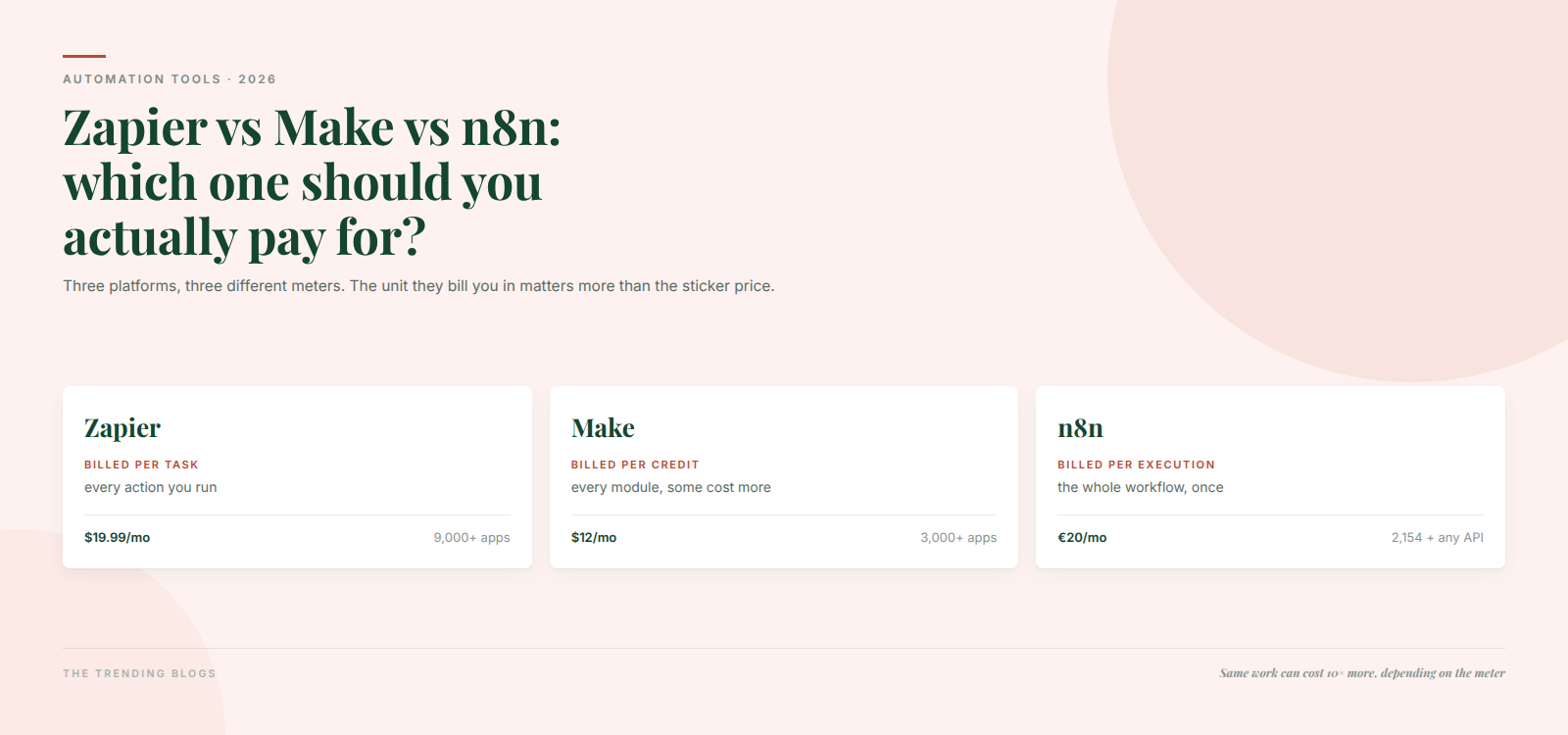
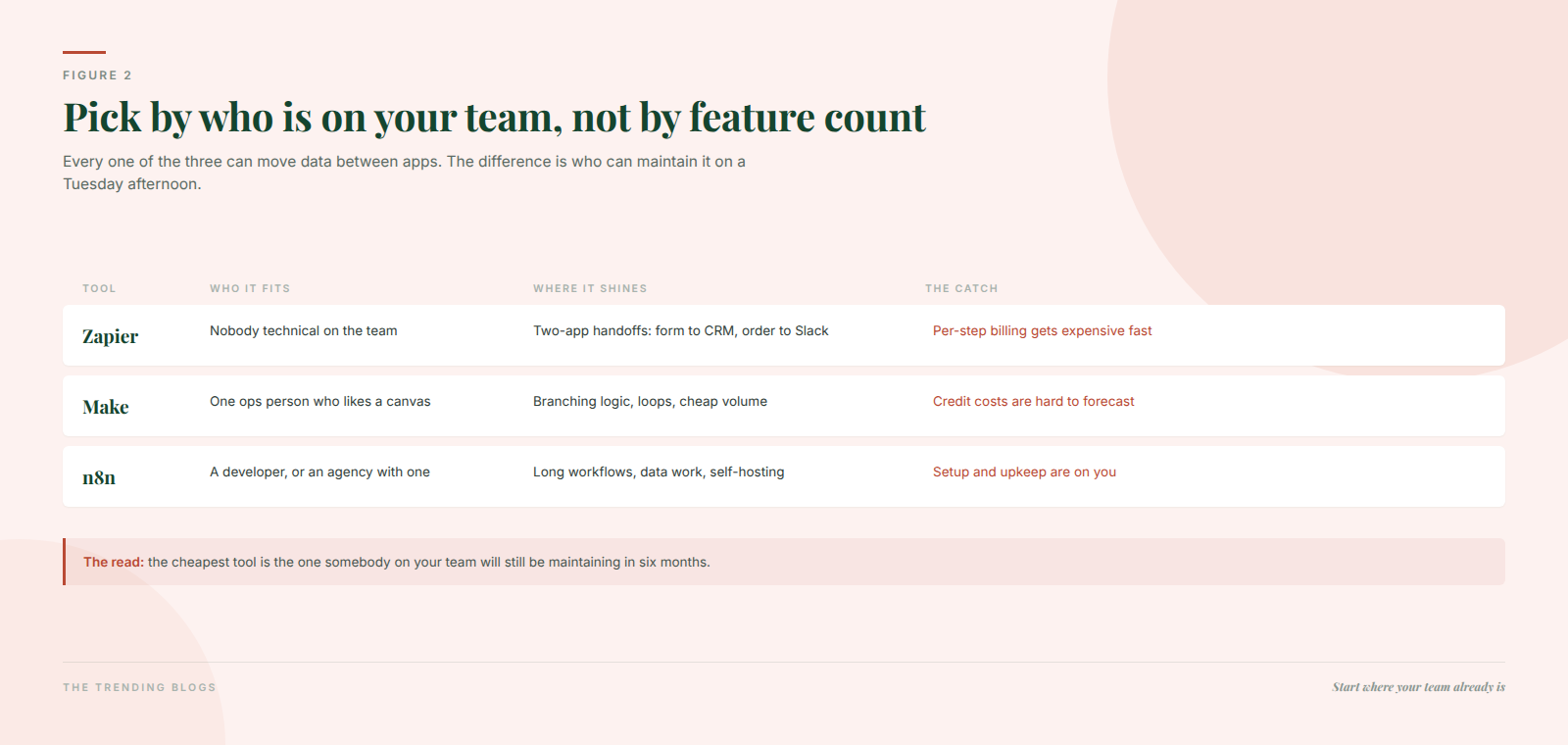
Here is the short version, and then the reasoning. Pick Zapier if nobody on the team is technical and your workflows are short. Pick Make if you have one ops-minded person and you want branching logic at low cost. Pick n8n if you have a developer, or workflows long enough that per-step billing has started to hurt.
The meter matters more than the price
This is the part most comparisons skip, and it is the single biggest driver of what you will actually pay.
- Zapier meters tasks. Every successful action counts. Triggers are free, but filters and paths consume a task even when they stop the Zap — so a noisy trigger you filter down to five percent still burns tasks on the ninety-five percent you threw away.
- Make meters credits. Make renamed its billing unit from “operations” to “credits” in 2026. One standard module action is one credit, but complex modules cost two to ten or more, and AI modules bill dynamically against token consumption. Any cost model you built on the old one-operation-one-module assumption is now wrong.
- n8n meters executions. One workflow run is one execution, whether it contains three steps or forty. Every plan also allows unlimited active workflows, which is the structural difference nobody puts in a feature table.
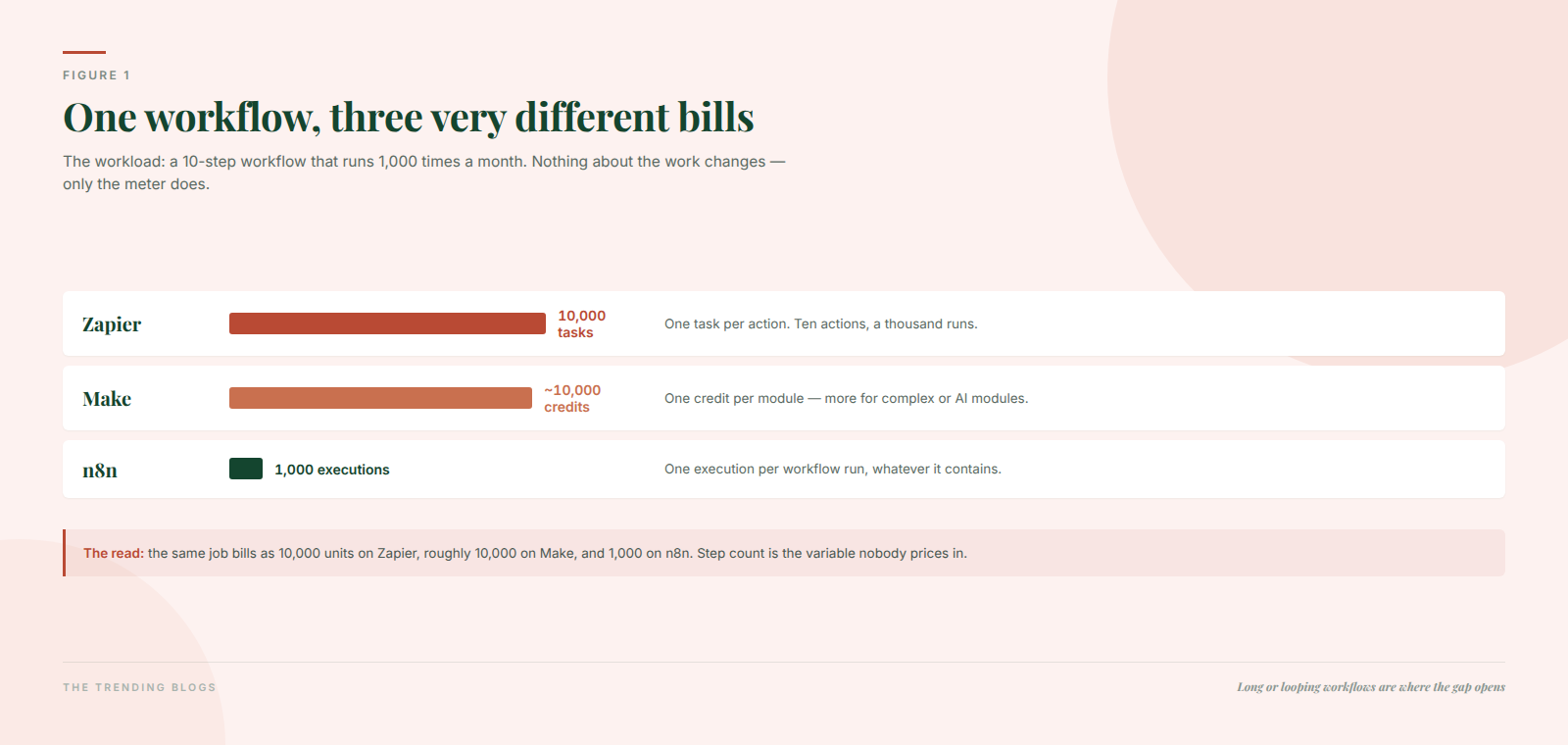
Take one realistic workflow: a lead arrives, you validate the phone number, check for duplicates, enrich the record, write it to the CRM, notify the owner, add it to a nurture list, log it in a sheet, and send an internal digest. Call it ten steps, running a thousand times a month.
That is ten thousand Zapier tasks, roughly ten thousand Make credits, and one thousand n8n executions. Identical work. A tenfold difference in billed units. No amount of plan shopping on Zapier closes that gap, because the gap is the meter, not the tier.
What each one actually costs in 2026
Prices move, and all three vendors present them through sliders, so treat these as the shape of the pricing rather than a quote. Check the live page before you commit budget.
| Platform | Free tier | Entry paid plan | Self-hosting |
|---|---|---|---|
| Zapier | 100 tasks a month, two-step Zaps only | Professional from about $19.99/mo billed annually for 750 tasks | No |
| Make | 1,000 credits a month, 2 active scenarios, 15-minute minimum interval | Core from about $12/mo, base tier 10,000 credits | No |
| n8n | None on cloud — trial only | Starter from about €20/mo, 2,500 executions, unlimited workflows | Yes, Community Edition, with licence conditions |
Two traps in that table. First, Zapier’s free plan caps you at two-step Zaps — so any workflow with a filter, a formatter, or a path is already a paid feature regardless of volume. The free tier cannot run a realistic workflow at all. Second, Make’s free tier’s fifteen-minute minimum interval means “instant” is a paid feature there too.
Connector counts are the most overrated number here
Zapier advertises 9,000-plus apps. Make lists around 3,000. n8n lists roughly 2,150. Those numbers look decisive and almost never are, for two reasons.
The first is that you will use six or seven apps, not nine thousand. Check that your six are covered properly — not just listed, but with the specific triggers and actions you need — and the headline number stops mattering. The second is that n8n ships a generic HTTP request node and a code node, so anything with an API is reachable with a bit of work. That trade is exactly the theme of this whole comparison: n8n asks for technical effort and gives back cost control and reach.
All three now sell AI agents. Only some of it is useful
Zapier has Agents plus a free MCP layer on every plan, where one MCP tool call costs two tasks. Make shipped AI Agents in beta across every plan including free, which is the most aggressive giveaway of the three. n8n has native MCP client and server nodes, an AI assistant, and bring-your-own-key setups on self-hosted enterprise.
The features are real. The framing usually is not. An agent is worth paying for when the task varies but “done right” is still clear enough to check — and it needs a human approving the output for anything that touches money or a relationship. If you can draw the flowchart, build a deterministic automation instead: it is cheaper and it fails loudly. We went through that decision in detail in our guide to what AI agents genuinely do well for small businesses, and the same rule applies when you are choosing which platform to run them on.
One more piece of 2026 context worth knowing: SAP invested in n8n at a $5.2 billion valuation in May 2026, more than doubling its late-2025 mark. The “developer-first option” is no longer the risky one to standardise on.
The self-hosting question, answered honestly
“n8n is free if you self-host” is true with two large asterisks.
The licence is fair-code, not OSI open source. The Sustainable Use License permits use for your own internal business purposes or non-commercial use. Running client workflows as a managed service, or white-labelling it, sits outside that and needs a commercial licence. If you are an agency, read the licence before you build a service on it.
The second asterisk is labour. A real self-hosted setup means queue mode, Redis, Postgres, upgrades, and backups — call it fifteen to fifty dollars a month of infrastructure before any of your own time. You are trading a twenty-euro bill for a maintenance job. That is a good trade at volume and a bad one at ten workflows.
How to choose in about twenty minutes
- Write down your three highest-value workflows and count the steps in each. If the average is under four steps, meter differences barely matter and you should optimise for ease. Over eight, the meter is your biggest cost lever.
- Estimate monthly runs for each. Multiply steps by runs for Zapier and Make. That is your billed-unit forecast. Compare against the tier you were about to buy.
- Name the maintainer. An actual person. If that person is you and you do not write code, that answer eliminates n8n regardless of price.
- Check your six apps, with the specific triggers and actions, on your shortlist of two.
- Build one workflow end to end on the free or trial tier before you pay for a year.
If you are not sure which workflows are worth automating in the first place, start there instead — our list of AI automation ideas that save small businesses hours every week is a better starting point than a pricing page, and the same thinking applies channel by channel when you automate Instagram marketing.
Three mistakes we see constantly
Automating a process nobody has written down. Automation makes a good process faster and a bad process faster at being bad. Write the steps out by hand first. Half the time the fix is deleting three of them.
Costing it on the old assumptions. Make’s 2026 switch to credits quietly broke pre-2026 spreadsheets, because complex modules and AI modules no longer cost one unit each. Re-run the numbers on the current metering, not the one you remember.
No error handling and no owner. Every workflow needs a path for the failure case and a named human who gets told. Silent failures are how a business discovers, three weeks later, that no leads reached the CRM. Once workflows carry revenue, they belong in whatever you use to watch performance — which is a good argument for making sure your analytics setup actually reports on the things that matter.
Whichever tool you pick, budget for it as part of marketing rather than a separate IT line. How much a small business should spend on marketing shows where tool subscriptions fit.
Zapier vs Make vs n8n: the bottom line
Zapier sells you simplicity and charges per step. Make sells you visual logic at a low headline price and charges in a unit that is harder to predict. n8n sells you cost control and reach and charges you in engineering time. Pick the one that matches your team, then re-check the choice when your step counts double — because that is the point at which the meter, not the plan, decides the bill. For the wider picture on where automation fits into a small business tool stack, our shortlist of AI tools worth paying for in 2026 covers the rest of the stack.
Common questions
Is Make cheaper than Zapier?
On paper, yes, and often in practice — the entry plan is around $12 a month for a base allowance of 10,000 credits, against roughly $19.99 for 750 Zapier tasks. The caveat is predictability: complex Make modules consume several credits each and AI modules bill against token usage, so your actual credit burn is harder to forecast than a task count.
What counts as a task in Zapier?
Every successful action a Zap performs. Triggers do not count, but filters and paths do — even when they stop the Zap. That last detail is what makes high-volume triggers expensive: you pay to discard the records you filtered out.
Is n8n really free to self-host?
The Community Edition has no licence fee, but the Sustainable Use License limits you to your own internal business purposes or non-commercial use — running client workflows as a service needs a commercial licence. And “free” excludes the infrastructure and maintenance, realistically fifteen to fifty dollars a month plus your time.
Which one is easiest for a beginner?
Zapier, clearly. Linear trigger-then-action logic, the largest connector library, and the shallowest learning curve. If nobody on your team writes code and your workflows are short, the premium buys you time you would otherwise spend debugging.
