Most WordPress speed advice is a list of twenty things to do in no particular order. That is why so many sites end up with three caching plugins, a delayed JavaScript setting nobody understands, and Core Web Vitals that are somehow worse than before. The metrics have not changed in 2026. The order you fix them in is what decides whether the work pays off. This Core Web Vitals WordPress guide puts those fixes in order, starting with the ones that move field data most.
What the metrics are in 2026 — and what they are not
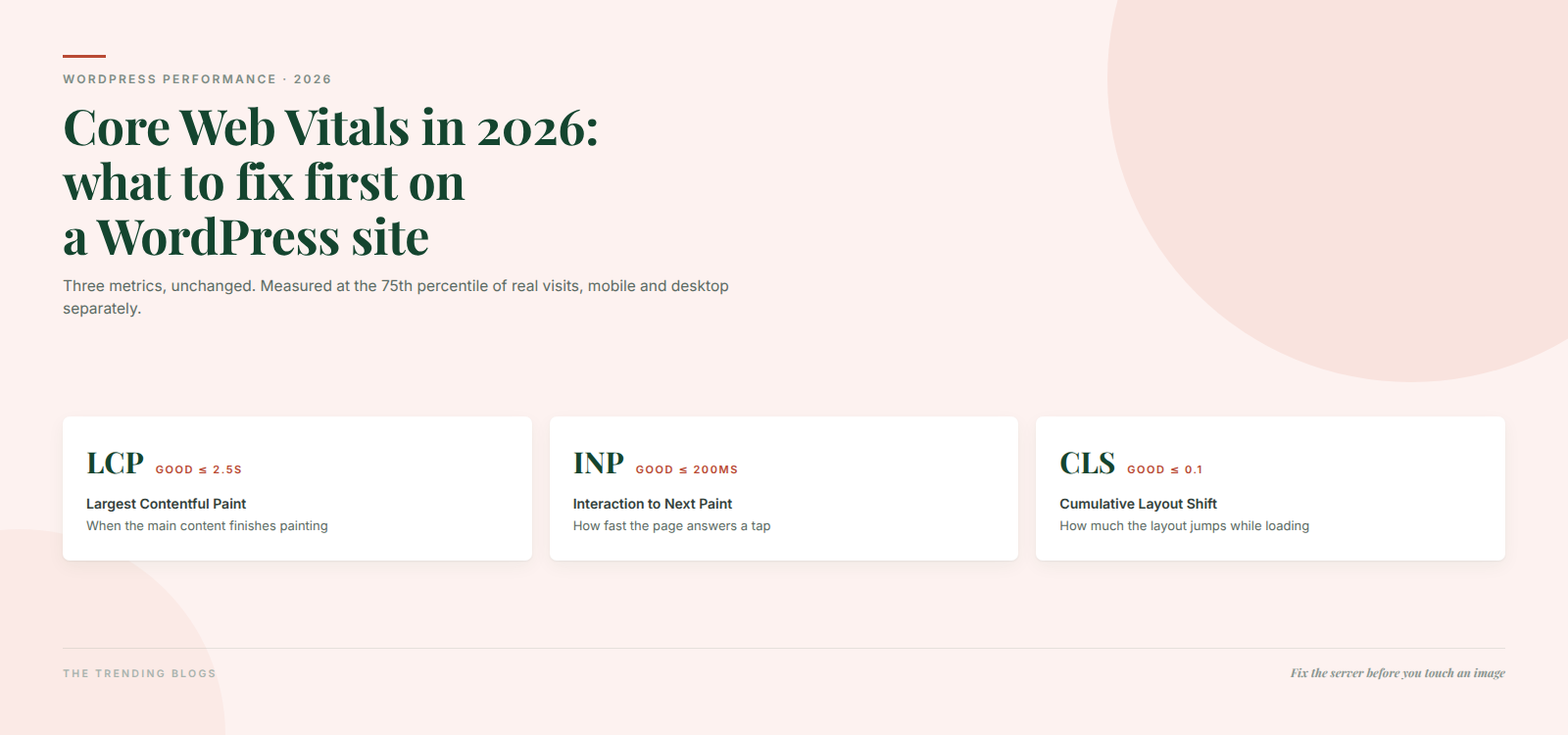
Three Core Web Vitals, unchanged: Largest Contentful Paint, Interaction to Next Paint, and Cumulative Layout Shift. INP is still the responsiveness metric, stable since it replaced FID in March 2024. No fourth vital has been added, and Google has committed to prior notice on an annual cadence for any change.
| Metric | Good | Needs improvement | Poor |
|---|---|---|---|
| LCP — when the main content appears | ≤ 2.5s | ≤ 4.0s | > 4.0s |
| INP — how fast the page answers a tap | ≤ 200ms | ≤ 500ms | > 500ms |
| CLS — how much the layout jumps | ≤ 0.1 | ≤ 0.25 | > 0.25 |
| TTFB — server response (diagnostic, not a vital) | ≤ 0.8s | ≤ 1.8s | > 1.8s |
Two details that change how you read your own numbers. Everything is assessed at the 75th percentile of real visits, split between mobile and desktop — so your fast desktop test says nothing about whether you pass. And Google’s own documentation is careful about the ranking claim: Core Web Vitals are used by ranking systems, there is no single “page experience signal”, and good scores do not outrank relevance. Fix them because they make money, not because you expect to leapfrog a better page.
On the money part, the case studies are unusually clean. Vodafone measured a 31% LCP improvement and saw sales rise 8%. Rakuten 24 reported a 33% lift in conversion rate and over 53% more revenue per visitor after Core Web Vitals work. Those are the numbers to take to whoever signs off the hosting bill.
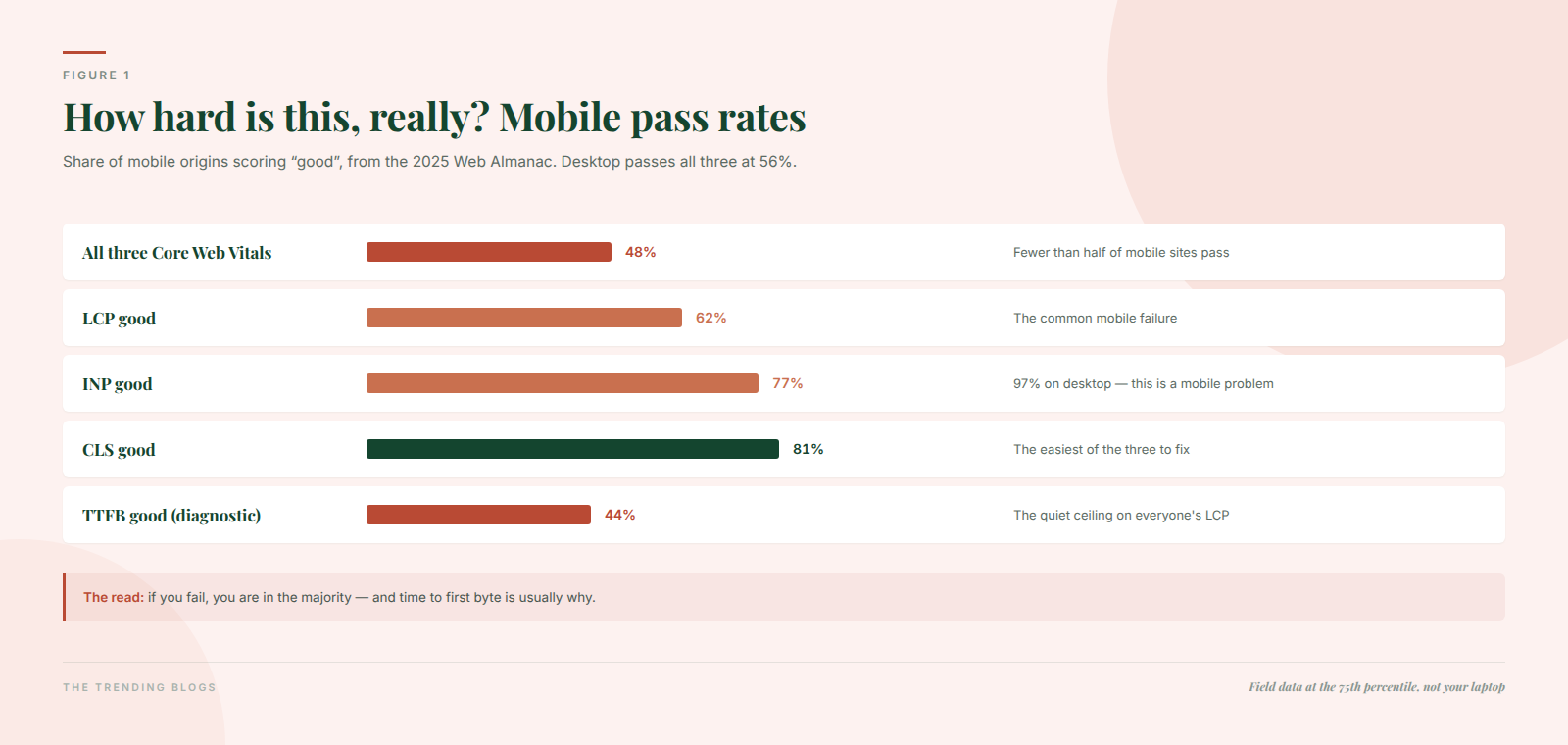
For context on how hard this is: the 2025 Web Almanac found 48% of mobile sites and 56% of desktop sites pass all three. LCP is the common failure on mobile at 62% good, and time to first byte is the quiet culprit — only 44% of mobile origins manage a good TTFB.
Diagnose before you install anything
The single most common waste of a weekend is optimising a page that was already passing, because Lighthouse gave it a yellow score. Field data and lab data answer different questions.
- Search Console’s Core Web Vitals report first. It uses real-user field data, grouped by URL pattern, so it tells you which groups of pages fail. Start here, always.
- PageSpeed Insights second. The top section is field data from real Chrome users over 28 days; the section below is a single throttled lab load. Treat field as the verdict and lab as a hypothesis.
- A real-user monitoring tool or the CrUX dataset for INP and CLS attribution. Lab tools cannot measure INP at all — Total Blocking Time is only a proxy.
- Chrome DevTools’ Performance panel last, once you know which page and which metric, to find the actual long task or the LCP element.
The Core Web Vitals WordPress fix order that actually works
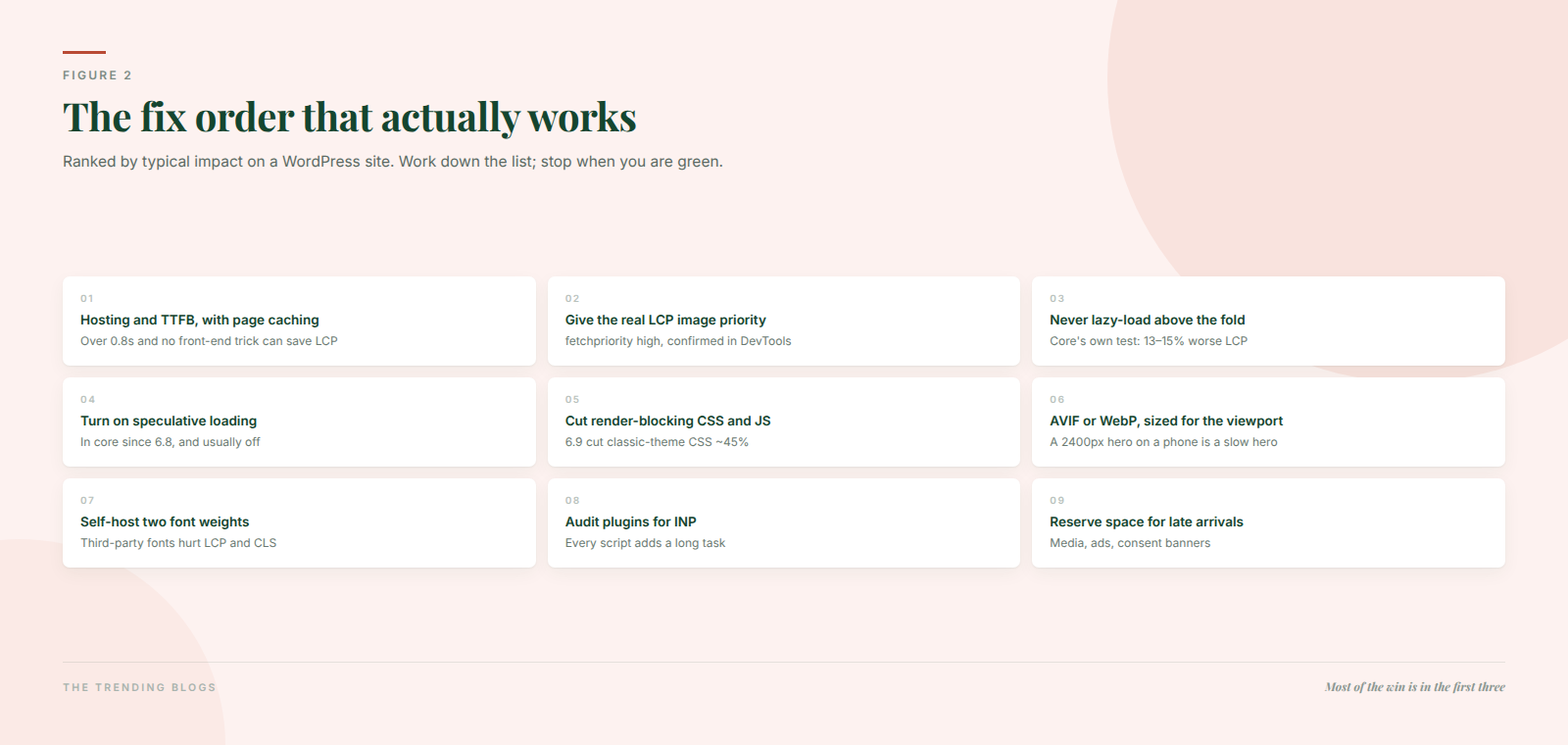
1. Hosting and TTFB, with page caching. A TTFB over 0.8 seconds puts a ceiling on LCP that no front-end trick can lift — the browser has not received anything to paint yet. Cheap shared hosting plus an uncached WooCommerce query is the most common version of this. Fix the server response and full-page caching before you touch a single image.
2. Give the LCP image priority. WordPress core has applied fetchpriority="high" to the likely hero image since 6.3, but themes, page builders and sliders routinely defeat it. Confirm in DevTools that your actual LCP element is the one getting priority. Nuvemshop’s case study on this single change reported 68% better LCP and nearly 9% more conversions.
3. Never lazy-load anything above the fold. WordPress core’s own research found that lazy-loading the LCP image degraded LCP by roughly 13 to 15%. Plugins that promise to “lazy load all images” will do exactly this to your hero. Exclude the first image, every time.
4. Turn on speculative loading. Since WordPress 6.8 this is in core, prefetching the next likely navigation by default in conservative mode. On a blog or a multi-step service site the effect on the second page view is dramatic — close to instant. It is free and most sites have simply never checked whether it is enabled.
5. Cut render-blocking CSS and JavaScript. WordPress 6.9 did real work here: on-demand block styles for classic themes cut CSS by about 45% on simple pages, the emoji script moved off the critical path, and Interactivity API modules load at low priority — worth roughly 8% LCP in Google’s testing. Staying current on core is a performance strategy, not just a security one. Current stable is WordPress 7.1, released 19 August 2026.
6. Modern image formats. AVIF and WebP are supported in core, and 7.1 added client-side media processing before upload. Serve the right size for the viewport too — a 2400px hero on a phone is a slow hero.
7. Self-host fonts. Two weights, font-display: swap, and preload the face your headline uses. Third-party font requests hurt both LCP and CLS.
8. Audit plugins for INP. Mobile INP is the weakest metric across the web: 77% good on mobile against 97% on desktop, and every plugin’s JavaScript adds long tasks that delay the browser’s answer to a tap. Deactivate rather than optimise. If a plugin loads scripts on every page for a feature used on one, dequeue it there.
9. Reserve space for everything that arrives late. Width and height on media, fixed slots for ads, and a consent banner that does not shove the page down. WordPress 6.9 fixed video-block shift by adding explicit dimensions — the same principle applies to anything you inject yourself.
If you want to see this order applied end to end on a real site, we documented the whole thing in how we took a site’s load time from 6.8 seconds to 1.2, including which changes moved the needle and which were theatre.
Images are usually the biggest LCP win on WordPress. The full workflow for WebP, sizing and lazy loading is in WordPress image optimization in 2026.
Three ways people make their scores worse
Delaying all JavaScript. The “delay JS until interaction” setting in aggressive optimisation plugins produces a beautiful Lighthouse score by moving the work to the moment the visitor taps something. Field INP gets worse, not better, and the visitor feels it directly.
Critical CSS gone wrong. Auto-generated critical CSS that arrives late produces a flash of unstyled content and a layout shift on exactly the pages you care about. If you use it, verify the templates one by one.
Chasing the lab score. Ranking systems use the 28-day, 75th-percentile field data. A green Lighthouse run on your laptop over office fibre is not evidence of anything.
Where speed work fits in the bigger picture
Speed is a multiplier on traffic you already have, which makes it worth doing before you spend more on acquiring more. It compounds two ways in 2026. On the paid side, a faster page lifts conversion rate on the clicks you are already buying — which is why page speed is the first item on our landing page checklist for paid ads. On the organic side, being fast and technically clean is part of being quotable: crawlers and AI answer engines both reward pages they can retrieve and parse cheaply, which we covered in how to get your business cited by ChatGPT and AI Overviews.
And if the work in this post reads like a job rather than an afternoon, that is a fair assessment — most of it is one-time infrastructure work. Our guide to choosing a web development agency covers what to ask for, and what a reasonable scope looks like, so you are buying an outcome rather than a plugin licence.
Start with Search Console, fix the server, protect the hero image, and re-measure in 28 days. That sequence gets most WordPress sites into the green with less work than the twenty-item checklists suggest.
The 90-minute version
If you have one sitting rather than one project, do these six things in this order and re-check the field data in four weeks.
- Open Search Console’s Core Web Vitals report and write down which URL group fails, and on which metric.
- Run your slowest failing template through PageSpeed Insights and record the field LCP, not the score.
- Check TTFB. If it is over 0.8 seconds, enable full-page caching and stop optimising anything else until it is under.
- Identify the LCP element in DevTools and confirm it is not lazy-loaded and does have high fetch priority.
- Confirm speculative loading is active — it has been in core since 6.8 and costs nothing.
- Deactivate every plugin you cannot name a current use for, then re-test on a phone over mobile data.
Common questions
Are Core Web Vitals still a ranking factor in 2026?
Yes, in the sense that Google says they are used by its ranking systems. But there is no standalone page experience signal any more, and Google is explicit that good scores do not outrank a more relevant page. Treat them as a conversion and quality investment that also helps search.
What is a good INP score?
200 milliseconds or less at the 75th percentile. Above 500ms is poor. INP cannot be measured in a lab tool — Total Blocking Time is only a proxy — so you need field data or a real-user monitoring tool to know where you stand.
Why does my site fail LCP on mobile but pass on desktop?
Because mobile is assessed separately, on slower networks and weaker CPUs, and because the mobile hero is often a large image scaled down in the browser rather than resized on the server. Across the web only 62% of mobile origins have good LCP against 74% on desktop — you are in normal company.
