Windows 10 end of support was supposed to be old news by now. Microsoft stopped free updates on October 14, 2025, and the paid Extended Security Updates (ESU) program was meant to be a one-year bridge. Then, in June 2026, Microsoft quietly pushed the consumer ESU end date out to October 12, 2027. As a result, plenty of small business owners read that headline and relaxed.
However, the extension doesn’t cover every PC. If IT manages your laptops through a domain or a device management tool, the date that matters is still October 13, 2026, which is this month. This guide explains what changed, which PCs the extension covers, what ESU costs a business, and a simple plan to get off Windows 10 without a panic purchase.
Windows 10 end of support: the dates that matter now
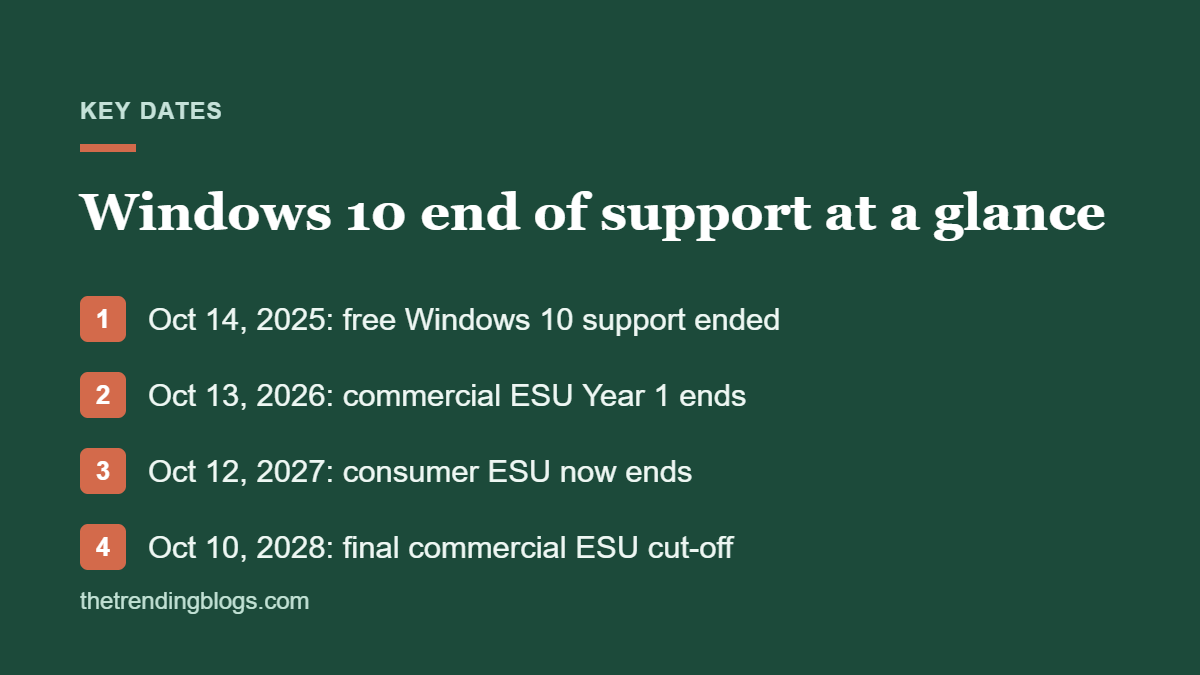
Here is the full timeline in one place. Bookmark it, because most of the confusion comes from mixing up the consumer and business programs.
| Date | What happens | Who it affects |
|---|---|---|
| October 14, 2025 | Windows 10 end of support. No more free security updates, fixes or technical help | Every Windows 10 PC |
| October 13, 2026 | Commercial ESU Year 1 ends (October Patch Tuesday) | Business PCs on paid commercial ESU |
| October 12, 2027 | Consumer ESU ends (extended from October 2026). Commercial ESU Year 2 ends | Home and unmanaged Pro PCs, plus business PCs that renew |
| October 10, 2028 | Commercial ESU Year 3 ends. This is the final cut-off | Business PCs that pay for all three years |
Microsoft has also said there is no fourth year. By late 2028, every Windows 10 PC you still own is unprotected.
What changed: consumer ESU now runs to October 2027
According to Microsoft’s ESU page, you can now enroll in consumer ESU any time until the program ends on October 12, 2027. If you already enrolled, your coverage continues automatically. You don’t need to do anything.
There are three ways to enroll:
- Free: sync your PC settings with Windows Backup using a Microsoft account
- Microsoft Rewards: redeem 1,000 points
- One-time purchase: $30 (or the local equivalent) plus tax
Once you enroll, you can use one ESU license on up to 10 devices. To qualify, the PC must run Windows 10 version 22H2 with the latest updates installed, and you need to sign in with a Microsoft account that has administrator rights. Users in the European Economic Area have slightly different enrollment conditions.
Does the extension cover your business PCs?
This is also where most small businesses get caught out. The consumer program excludes PCs that are:
- Joined to an Active Directory or Microsoft Entra domain
- Managed through mobile device management (MDM), such as Intune
- Used as kiosks or in other managed setups
A three-person shop with unmanaged Windows 10 Pro laptops, each signed in with its own Microsoft account, can usually use the consumer program. A 20-person office where IT manages every laptop cannot. As TechRepublic’s ESU cheat sheet puts it, the $30 consumer plan is not a way to cover a business fleet.
What commercial ESU costs
Managed business PCs need commercial ESU. Microsoft charges per device, and the price doubles every year:
- Year 1 (to October 13, 2026): $61 per device
- Year 2 (to October 12, 2027): $122 per device
- Year 3 (to October 10, 2028): $244 per device
Coverage is cumulative. If you skipped Year 1 and want Year 2, you pay for both years, so a late joiner pays $183 per device. For ten PCs, staying on Windows 10 until 2028 can cost more than $4,000 in ESU fees alone, which is often more than replacing the oldest machines.
Microsoft has also said that Windows 10 devices used to access Windows 365 Cloud PCs, and Windows 10 virtual machines in Azure Virtual Desktop, get ESU at no extra cost. That matters if you are already moving staff to cloud PCs.
What ESU gives you, and what it doesn’t
ESU only delivers security updates rated Critical or Important. You don’t get new features, non-security bug fixes, design changes or Microsoft technical support. Over time, other software will drop Windows 10 too. Browsers, printer drivers, accounting software and line-of-business apps each set their own deadlines.
Microsoft 365 apps are one exception worth knowing about. Microsoft said in 2025 that Microsoft 365 apps on Windows 10 will keep getting security updates until October 2028, so Outlook, Word and Excel won’t stop working overnight.
Why using Windows 10 after end of support is a risk for a business
After all, an unpatched PC is an open door. The 2026 Verizon Data Breach Investigations Report found that exploited software vulnerabilities are now the most common way attackers get in, ahead of stolen passwords, and ransomware shows up in nearly half of breaches. Old, unsupported systems are exactly what those attacks look for.
There are also business costs. Cyber insurance applications ask about unsupported operating systems. Card payment rules also expect you to patch your systems. And if a client asks how you protect their data, “we’re still on Windows 10 with no updates” is not a good answer.
A 5-step Windows 10 end of support plan
Still, you don’t need to replace everything this week. You need a list, a decision for each PC, and a date.
- Take inventory. For each PC, open Settings > System > About and note the Windows edition, version, age and who uses it. A simple spreadsheet is enough.
- Check Windows 11 eligibility. Run Microsoft’s free PC Health Check app. Windows 11 needs TPM 2.0, Secure Boot, a supported processor, at least 4 GB of RAM and 64 GB of storage. Many PCs from 2018 or later pass.
- Upgrade the eligible PCs for free. Back up first, then upgrade through Windows Update. Do one test machine before the rest, and check that your printers and key apps work.
- Put the rest on ESU. Unmanaged PCs can use consumer ESU through 2027. Managed PCs need commercial ESU. Either way, ESU buys time. It isn’t a plan.
- Budget replacements. Schedule new PCs for the machines that can’t run Windows 11, oldest and most-used first. Year-end deals are a good time to buy, and your accountant can tell you how the tax rules treat equipment purchases.
Before any upgrade, make sure you’ve backed up your files and passwords. Our WordPress security and backup checklist covers the 3-2-1 backup rule, which applies to office PCs just as much as websites.
How to enroll a PC in consumer ESU
If a PC qualifies for the consumer program, enrollment takes about five minutes:
- Install all pending updates and confirm the PC is on Windows 10 version 22H2.
- Sign in with a Microsoft account that has administrator rights.
- Go to Settings > Update & Security > Windows Update and select Enroll now under the Extended Security Updates notice.
- Choose an option: Windows Backup (free), 1,000 Rewards points or the $30 purchase.
- Confirm, then check Windows Update again to make sure ESU updates are arriving.
If you don’t see the enrollment link, the PC is usually missing updates, running an older version or managed by an organization.
What about PCs that can’t run Windows 11?
Older PCs still have a few useful lives left:
- Keep them on ESU until 2027, then retire them on a planned date instead of when they break.
- Turn browser-only machines into something simpler. A front-desk PC that only runs a booking site can often move to ChromeOS Flex or a Chromebook.
- Use them as thin clients for Windows 365 Cloud PCs, which also brings free ESU.
Avoid registry hacks that force Windows 11 onto unsupported hardware. Microsoft doesn’t support those installs, and they may not receive updates reliably, which defeats the point.
Your Windows 10 end of support timeline for the rest of 2026
- This week: inventory every PC and run PC Health Check.
- Before October 13: renew or buy commercial ESU for managed PCs you can’t upgrade in time.
- October and November: upgrade eligible PCs to Windows 11, one department at a time.
- December: order replacements for the PCs that can’t upgrade, and enroll them in ESU until they arrive.
If you’re also reviewing software and subscriptions for 2027, our list of AI tools every small business should use is a good place to see what your new PCs should run. And if you’re using the change to rethink how work gets done, read our guide to AI agents for small business.
Common questions
Is Windows 10 safe to use after end of support?
Only if it’s enrolled in ESU and installing updates. A Windows 10 PC without ESU hasn’t had a security patch since October 2025, so every vulnerability found since then is unfixed.
Did Microsoft extend Windows 10 end of support to 2027?
Not exactly. Windows 10 end of support was October 14, 2025, and that hasn’t changed. What Microsoft extended is the consumer ESU program, which now delivers security updates until October 12, 2027. You still don’t get features, fixes or technical support.
How much does Windows 10 ESU cost for a business?
Commercial ESU is $61 per device for Year 1, $122 for Year 2 and $244 for Year 3. Years are cumulative, so joining late means paying for the years you missed.
Can I still upgrade to Windows 11 for free?
Yes, if the PC meets the Windows 11 hardware requirements. Microsoft offers the upgrade through Windows Update. Check eligibility with the PC Health Check app first.
What happens on October 13, 2026?
Commercial ESU Year 1 ends on that day’s Patch Tuesday. Business PCs on commercial ESU stop getting updates unless you buy Year 2. Consumer ESU PCs keep getting updates until October 12, 2027.
